Your website as the source
You maintain your events on your website anyway? Then you do not have to enter them here a second time.
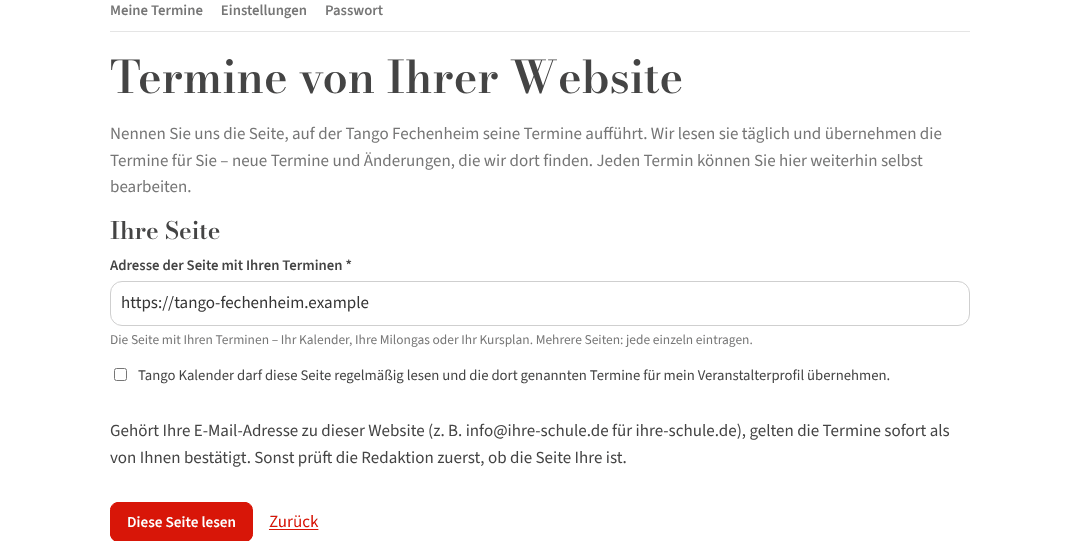
Setting it up
- Under My events, behind your organizer profile, sits the link Events from your website.
- Enter the address of the page with your events – the page where the dates are, not the home page.
- Tick that Tango Kalender may read this page regularly, and click Read this page.
When the domain of your email address matches the website, the events read count as ✓ Confirmed at once. Otherwise the editors check once that the page really is yours.
In operation
- We read the page daily; new events appear in your account as confirmed events that you can edit like your own.
- Update now reads the page right away (possible every 15 minutes) – handy after a change.
- Stop reading ends the reading; the events taken over stay in your account.
- The table shows “Last read” and how many events were found at the last reading.
What we take care of
The crawler is called TangoKalenderBot, reads at most one page per second, honours robots.txt, never signs in and fills in no forms. It takes over data, not texts and not pictures – your description stays yours. More under How our research works.
Several pages (say milongas and classes apart) you enter one after the other: “Add another page”.